
IDX Screener for big-caps with unusual volume
Configure the IDX Screener to surface liquid big-caps trading at well-above-average volume, an early signal of institutional accumulation or distribution.
Volume well above average in liquid big-caps is rarely retail, the capital required to move volume in a Rp 100 trillion cap stock implies institutional positioning. This workflow sets up /idx/screener to surface big-caps with significant daily volume, as your daily watchlist seed.
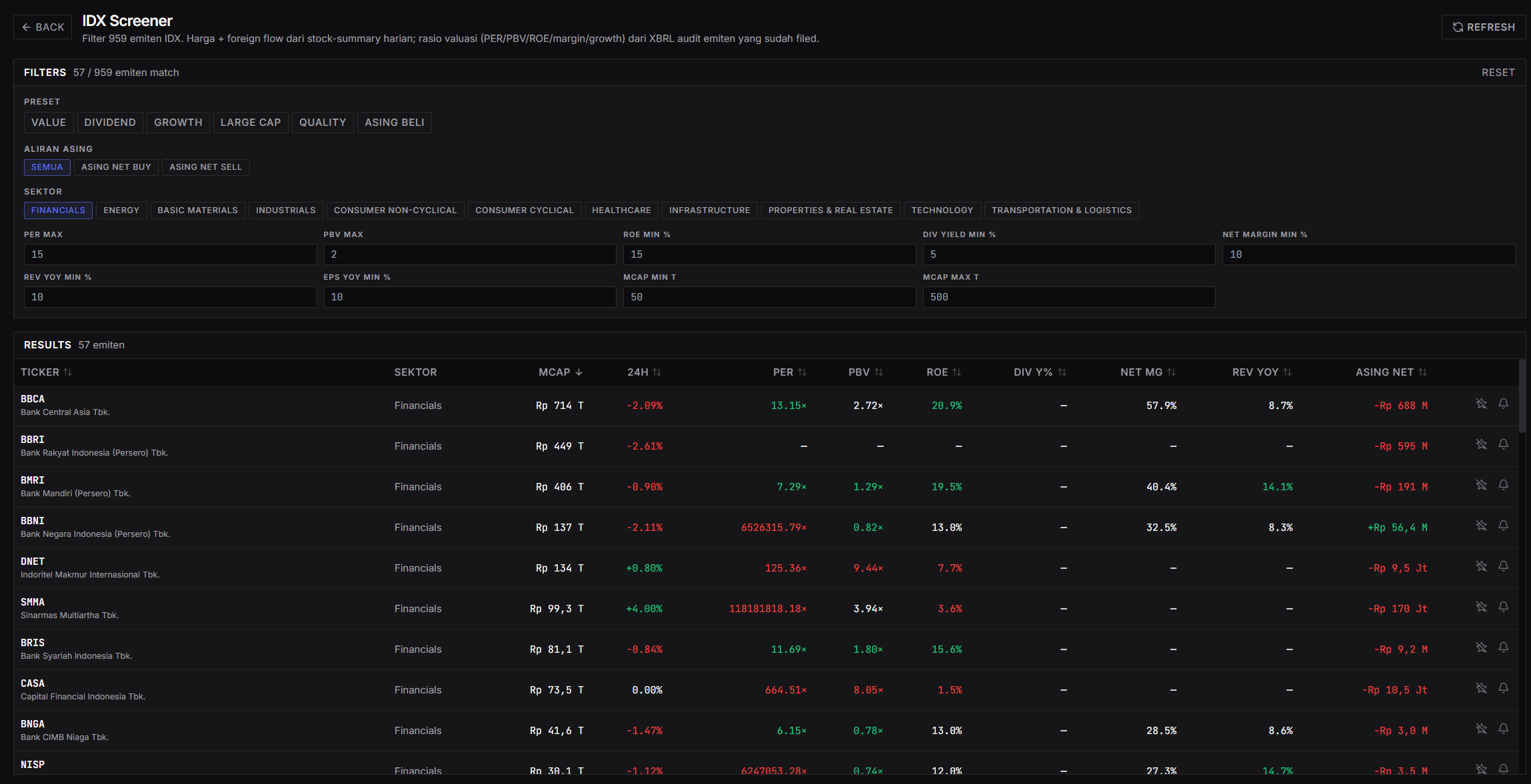
Available filters
The /idx/screener panel supports combinations of:
- Quick presets: VALUE, DIVIDEND, GROWTH, LARGE CAP, QUALITY, ASING BELI (foreign buy).
- Foreign flow: SEMUA (all), ASING NET BUY, ASING NET SELL.
- Sector (multi-select): FINANCIALS, ENERGY, BASIC MATERIALS, INDUSTRIALS, CONSUMER NON-CYCLICAL, CONSUMER CYCLICAL, HEALTHCARE, INFRASTRUCTURE, PROPERTIES & REAL ESTATE, TECHNOLOGY, TRANSPORTATION & LOGISTICS.
- Valuation: PER MAX, PBV MAX, ROE MIN %, DIV YIELD MIN %, NET MARGIN MIN %.
- Growth: REV YOY MIN %, EPS YOY MIN %.
- Market cap: MCAP MIN T, MCAP MAX T (in trillion rupiah).
For the “big-cap unusual volume” workflow, the key combination is MCAP MIN + ASING NET BUY (as a proxy for institutional validation).
Workflow: build the big-cap screener
- Open
/idx/screener. - Set filters:
- MCAP MIN T: 50 (covers the top ~80 emitens that qualify as big-cap).
- MCAP MAX T: 500 (or leave blank for no upper bound).
- Foreign flow: select ASING NET BUY to focus on big-caps foreigners are buying that day, a proxy for unusual buying interest.
- Sector: leave blank (all sectors) for a broad scan. Filter by sector if you have a specific thesis.
- ROE MIN %: optional, set 15 to keep only fundamentally healthy stocks.
- Look at results in the right panel. Sort by MCAP (default) or 24H % to find the movers.
- Cross-reference top results to Foreign Flow (
/idx/foreign-flow), if the same emiten shows up in top foreign net-buy, the signal is stronger. Volume + foreign flow aligned = institutional move. - Click an emiten through to
/idx/<ticker>for context: check the chart panel, fundamentals, and any recent news/event.
Save as preset
Configurations you use often (e.g. “MCAP > 50T, ASING NET BUY, ROE > 15”) should be saved as presets. The daily workflow becomes: open preset → 30-second scan → identify 2–4 emitens worth a deep dive.
Interpreting unusual volume + foreign net buy
The combination is not directional on its own, context decides:
- Big-cap + ASING NET BUY + price gap up + positive news = breakout setup, watch for confirmation on the next candle.
- Big-cap + ASING NET BUY + price down = institutions buying the dip. Often precedes reversal.
- Big-cap + ASING NET BUY + price flat (range-bound) = quiet accumulation. Wait for price action, don’t trade on volume signal alone.
- High volume sustained 3+ days + price drifting up = institutions building a position slowly, follow-through likely.
Common pitfalls
- Using the same absolute market cap threshold across sectors. Banking sector (BBCA, BBRI) normal volume is far higher than consumer sector. Threshold should be relative (% of avg) or set per sector.
- Treating volume as direction. Volume only signals attention, not bias. Large distribution also has high volume. Context (price action, foreign flow) is what gives it direction.
- Trading screener results without cross-checking. The screener output is a candidate watchlist, not a trade signal. Minimum step: check chart + foreign flow + news before entry.
- Forgetting to adjust for corporate actions. A 5× normal volume spike on ex-dividend day or after a stock split is an artifact, not a signal. Check the IDX calendar for corporate actions.
- Not reviewing presets periodically. A threshold valid 6 months ago may not be valid now (avg volume shifts with market growth/contraction). Re-tune presets quarterly.